New platform: GLFW3! #172
Conversation


|
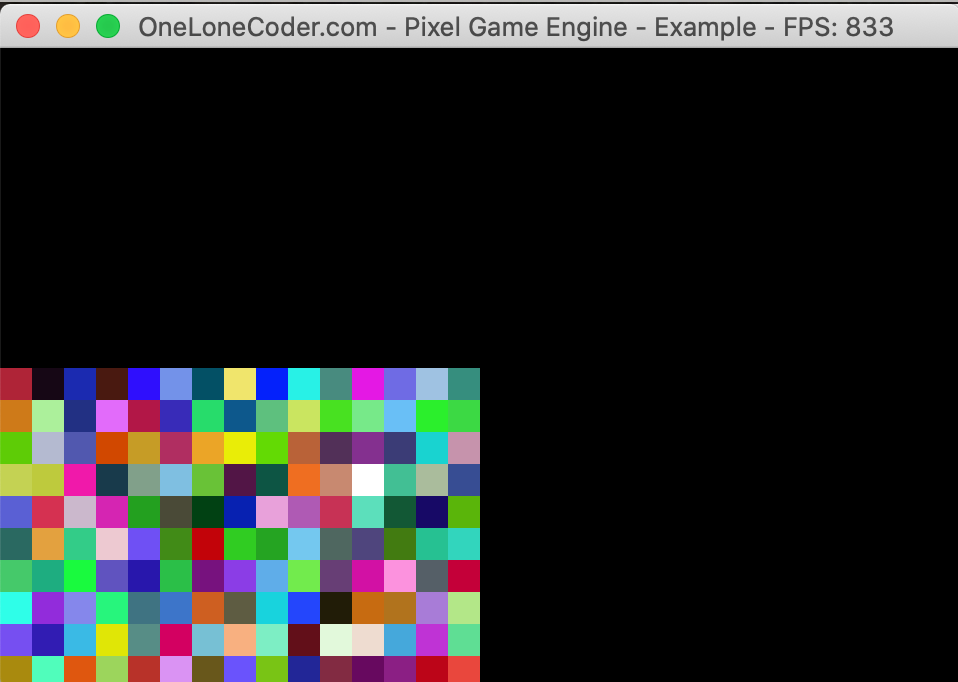
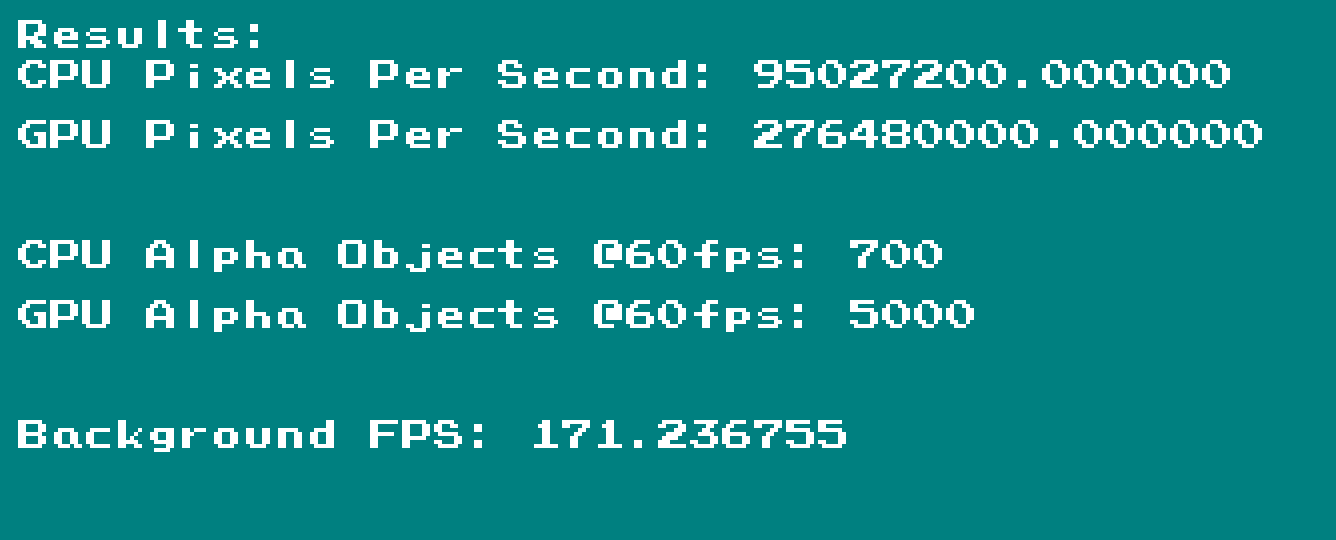
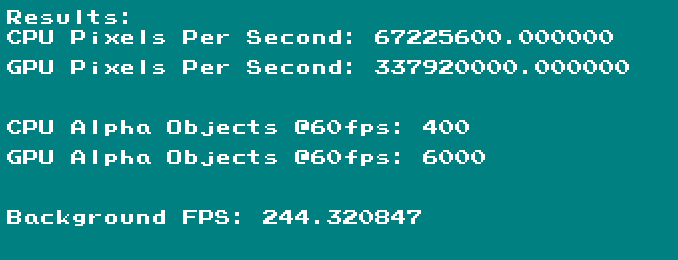
Hey! Nice job on the port! I tested out the glfw port vs. the glut port on my machine. On the example program, the fps did double, but there is this bug where the image only takes up the bottom left of the window. I also tested out the cpu/gpu test javid made: Good luck! |

|
@MumflrFumperdink Interesting. Thanks for testing! I ran into that bug where everything is rendered to the lower quadrant as well, however on my Macbook Pro 13" (macos 10.15.5) it disappeared with the addition of line 4092:
Mind if I ask what hardware/OS you're using? |
|
I'm using MacBook Air 13" (macOS 10.15.6) |
|
Couple more questions, if you don’t mind:
At some point tonight I’ll upgrade to 10.5.6 and see if I incur the same issue. Thanks again for your input! |

|
Just to add more data to the pile: Computer:
GLFW:
Modifications:
Results:
|
|
|
@MumflrFumperdink @Zij-IT Awesome. Thank you guys for the input. Seems like GLFW 3.3.2 is a hard requirement for this to work so I will update the main notes with that detail. I also had to reduce the resolution on my machine to get the sample code to fit. Super helpful! |

|
Looks great, but I'd appreciate it if you made your back-end not exclusive to Macs. It should be pretty easy to make it available on other platforms and I could actually benefit from it on Linux. |
|
@olc-slav I'd actually love to make it not exclusive to Mac! I'm actually thinking about doing exactly that on a different branch and will PR when done for it to be reviewed (Mac was my immediate need). I specifically chose to not make this specific contribution a dedicated, "first-class" platform because it would necessitate quite a few changes to the existing code in a way I didn't feel comfortable doing as a first contribution, and as someone new to the community. I think that choice needs to be made by @OneLoneCoder. After pinging folks on discord and hearing a little bit of feedback here, it seems like there's a very real desire to offer a dedicated, cross-platform GLFW backend, which I'm more than happy to do. Although I can test all three platforms on my end, I'll definitely need some help and input from the community. :D |

 olc-slav
left a comment
olc-slav
left a comment
olc-slav
left a comment
There was a problem hiding this comment.
Just noticed a couple issues. They're pretty small but it'd be good to deal with them.
|
You should be able to remove that 1ms wait now, `glfwWaitEvents` should
do all the waiting you need
|
|
@olc-slav Which platforms would you have available to test (and would you be interested in testing) if I tried to get a non-Apple-exclusive GLFW port going in the next few days? I'm currently on vacation right now and all I have is my Mac laptop until Monday 9/28. |
|
Linux. I could also do Windows if needed but I'm sure there are people
here who would be more suitable for that.
|
|
@olc-slav I've created a standalone, fully cross-platform version of the GLFW platform that I've tested in an Ubuntu 20.04 VM and it seems to be working there. It's building on Windows, but not running for some reason so I'm hesitant to create a legit pull request until I can actually ensure that the code is working. I think it has to do with my linking config in the Windows VM and not necessarily an actual code issue, but the VM is so slow that I just gave up today until I can actually test on real hardware. Feel free to give it a try if you want and let me know if you run into any issues (linux or windows). https://github.com/johnmarianhoffman/olcPixelGameEngine/tree/glfw_standalone_platform |
|
I've done some minor testing (built the example program and checked if
it ran). Seems to work fine with Xorg, but the main reason I am
personally interested in the GLFW backend is that GLFW supports Wayland.
Long story short, there's a small issue in your code.
According to the GLFW docs, "a context must only be made current on a
single thread at a time and each thread can have only a single current
context at a time". This is not the case with your code: the GLFW
window, and the OpenGL context along with it, are created on the main
thread, but all drawing is done on a different one, the "engine" thread.
However, the main thread still has the context, which leads to some
errors on the GLFW side. Adding `glfwMakeContextCurrent(nullptr)` at the
end of the `CreateWindowPane` function seems to be the simplest way to
fix this problem.
Ideally, we should get rid of that second thread, it's not really needed
here. It's a pretty significant change that should affect all PGE
platforms one way or another, and I'm not sure what would be the best
way to approach it yet. But it would be nice if your code relied on
having multiple threads as little as possible.
Currently you're doing event handing on the main thread: you've got an
infinite loop in `StartSystemEventLoop`. However, instead of that, you
could do a single iteration of that loop in the `HandleSystemEvent`
function, which is run on the "engine" thread. Funnily enough, this
would also mean reverting the changes you made after my last "review".
Oh and yeah, perhaps `glfwInit` and `glfwTerminate` should be done in
the `ApplicationStartUp` and `ApplicationCleanUp` functions.
|
|
@olc-slav Ah yes. Context switching. I am familiar (although certainly not expert). haha. In my initial bringup of the mac version I did a lot of reading about contexts and GLFW however didn't walk away feeling like I completely grasped it. I agree that the programming model for GLFW really wants you to do anything windowing or OpenGL related the main thread, and the cleanest thing here would be to do away with threading model used by PGE. That being said, I don't think that's especially realistic and would be more suitable for a hard fork. The cleanest solution to fit GLFW into the existing PGE design pattern would be to migrate all GLFW code to the EngineThread (i.e. ThreadStartUp/ThreadCleanUp/etc.) however my concern is that this will cause the Mac version to fail since: "Cocoa has an event queue per thread that can only be accessed from that thread, but the main thread event queue is the one that receives window and input events, and most window and view operations may only be performed on the main thread." (https://discourse.glfw.org/t/multithreading-glfw/573/5). Although I can't confirm that relocating EVERYTHING to the Engine thread won't fix the problem, my general experience is that when they say "main thread" they mean the program's main thread, and no amount of context switching can save you on a mac (edit: no amount can save you when it comes to specific windowing calls. Rendering seems to be OK.) Now that I understand PGE a bit better, I will try for a "correct" solution (i.e. everything windowing and GL-related on the EngineThread) as well as a "functional" solution that uses threading but with context switching. I think the latter is more likely to ever make it out of experimentation, and also the latter is currently working without errors on Mac and my Linux VM. I think it's very possible that GLFW may just not perfectly fit into the current design of PGE. You mentioned some "errors on the GLFW side." I have not encountered any on Mac or Linux. Can you pass those along as you encounter them? |
|
Yes, I didn't notice that GLFW requires event handling to be done on the
main thread. Sorry, forget what I said about moving it to the engine
thread, then.
But still, it's ok to do rendering on the engine thread, you just need
to make sure to release the context from the main thread beforehand. You
should be able to do that by calling `glfwMakeContextCurrent(nullptr)`
at the end of the `CreateWindowPane` function.
The errors I got said this:
EGL: Failed to make context current: EGL cannot access a requested
resource
Cannot set swap interval without a current OpenGL or OpenGL ES context
EGL: The context must be current on the calling thread when swapping
buffers
The first error is produced by the call to `glfwMakeContextCurrent` in
`Renderer_OGL10::CreateDevice`. The rest are just the result of GLFW not
being able to set the current context for the engine thread.
|
|
@olc-slav Seems to me that anything wrapped in a should be mutexed. Otherwise the separate threads could attempt to steal the context before the other has relinquished it. I can't gather from the docs whether or not they'll respect one another. Thoughts? |
|
The engine thread is created after `CreateWindowPane` finishes (see
`PixelGameEngine::Start()`), so it's fine as it is.
|
|
@olc-slav It actually occurs to me that we didn't even need to pull the context for the CreateWindowPane; we can cede all control of the context to the engine thread, and no other calls that we use require the context. I've removed it and tested it and seems to run fine on linux and mac. Let me know if you run into issues. P.S. Have you been testing/able to test on Wayland? |
|
Oh, that's a good catch. Yeah, that seems to be working well.
I'm testing your code on X11 and Wayland.
And yeah, can you still build the example program with the original X11
backend? I'm having problems doing that, the compiler does not see any
OpenGL functions. One example of the error messages I get:
olcPixelGameEngine.h:3037:4: error: ‘glViewport’ was not declared in
this scope; did you mean ‘X11::glViewport’?
I see you've changed the way OpenGL headers are included, that's
probably why this happens. Could you take a look?
|
|
@olc-slav Just pushed a fix so it should be resolved. X11 was include-order sensitive. |
4 participants


GLFW OLC PGE Port Notes
Why GLFW?
GLFW is a modern, well-maintained, and simple cross-platform windowing and input system. It could theoretically replace all of the platform-specific windowing code in OLC (although I am not proposing this).
I've made this port because I was running into issues with the GLUT implementation on MacOS and it's handling/integration with the PGE ImGUI integration (https://github.com/dandistine/olcPGEDearImGui which is WONDERFUL by the way). This ended up being a platform-level problem, which also appears in the GLUT examples from ImGUI; the problem appears to be GLUT on MacOS. Although the GLUT implementation on MacOS is maintained, I think that it's a little antiquated in its constructs and design choices compared to GLFW, and thus provided GLFW as a compile option to those wishing to use it (or running into bugs with GLUT) would be a worthwhile addition to the PGE without adding too much complexity.
GLFW implementations could also be made available for Linux and Windows, although at present, that seems unnecessary and would require a fair bit of modification to existing code design.
Finally, GLFW performs better on MacOS. With GLFW3, I am achieving framerates on my Macbook Pro of ~700fps for the olcExampleProgram.cpp. Using GLUT, I only achieve frame rates of 550-600fps.
Why maybe NOT GLFW?
The beauty of OLC PGE is its simplicity, and that it uses platform-specific packages the come preinstalled on the platforms being targeted. PGE has made it so you don't need to be super familiar with the C++ build chain to get graphics in C++, which truly has not existed to date.
GLFW (sort of) violates this design principle, since a user must install GLFW separately and link it into the project. I don't see this as a major hurdle, since linking is still platform specific with the current PGE, however since there is an extra download or build step, it's not quite as simple.
I hope that GLFW will one day become a core platform library, however it is not currently and thus adds slight complexity to the build chain should a user wish to use it.
Scope
#define __GLFW__somewhere in their project (main.cpp is probably best).Possible future work
Quirks (perhaps look like weird design choices)
GLFW + MacOS are pretty stubborn about threading, PGE uses threading
As a result, we have to do most of our GLFW stuff in the main thread and not as part of the engine loop (where it feels more natural). Knock-on effects of this are:
All system event polling MUST be done in the StartSystemEventLoop method of the platform, which is called from the main thread. This means event polling is running asynchronously from frame updates. I've added a 1ms delay so that this thread doesn't just spin the CPU completely unecessarily. This can easily be removed if you need faster polling.
Unfortunately setting the window title on mac falls under the "things that must be done on the main thread," so I've had to implement a workaround setting an internal state of the platform class, which is then only pushed to the window as part of the main event loop. It feels a little crazy, but without it this way, the app crashes on Mac.
Currently limited to MacOS
Because, at present, there does not seem to be a need for Linux or Windows to support GLFW3, I haven't added the options. I would be happy to extend this work though if desired by the community.
GLFW 3.3.2 is required (updated/added 9/21)
It appears that 3.3.2 is a hard requirement for support on retina displays. I'm guessing that the retina window hint was added in this version (this should be ignored by non-Mac, non-retina systems). Thanks to @MumflrFumperdink and @ Zij-IT for the help in finding this.
Compiling olcExampleProgram on MacOS
(1) Uncomment the "#define __GLFW__" in the olcExampleProgram (or add to the top if missing)
(2) Compile command:
clang++ -std=c++17 olcExampleProgram.cpp -lz -lpng -framework OpenGL -lglfw3 -framework Cocoa -framework IOKit -framework CoreFoundation -o olcExampleProgram